
What Actually Happens When You Do a Systematic Review

Photo by 🇸🇮 Janko Ferlič on Unsplash.
Systematic reviews can look intimidating when you first come across them. A PRISMA diagram, a long database search, risk-of-bias tools and a forest plot full of numbers can make the whole process look more complicated than it is. I talk to a lot of doctors who want to know how to do a systematic review and keep hitting the same wall: they understand what a review is supposed to do, but nobody has shown them how the stages fit together.
You do not need to be a statistician or an experienced researcher to understand the basic workflow. The harder part is often seeing how one step leads to the next.
In this article, I will take one simple question from start to finish: “In adults with hypertension, does home blood-pressure monitoring improve blood-pressure control compared with usual care?” You will see how that question becomes a PICO framework, a PubMed search, a set of studies to screen, a PRISMA diagram, an extraction table and, if the studies can sensibly be combined, a forest plot.
This is not a promise that a first review will be quick or publishable. It is a practical walk-through of what doing one actually involves, in the order I do it, using the tools I find useful.
Research question → PICO → PubMed search → search results → Rayyan deduplication and title/abstract screening → Zotero full-text review → PRISMA → included studies → data extraction → risk of bias → meta-analysis or narrative synthesis
A note about the examples: the screenshots and diagrams in this article use an illustrative review of home blood-pressure monitoring. The record counts, extracted rows and pooled estimate are demonstration data, not the findings of a published review.
I am also putting together a free webinar where I will walk through this process live, from research question to review workflow.
In this post
- What a systematic review actually is
- Start with a good question
- Check what already exists
- Write and register a protocol
- Build and run the search
- Export to Rayyan and remove duplicates
- Screen the studies
- Track the screening process with PRISMA
- Extract the data and assess risk of bias
- Synthesise and interpret the evidence
- Why this is a team job
- Where AI fits
What a systematic review actually is
A systematic review is a structured way of gathering and appraising the existing evidence on a specific question. Its conclusion should reflect what the literature as a whole says, rather than one or two studies you happened to read.
A common misconception is that a systematic review must end in a meta-analysis. It does not. A meta-analysis is a statistical technique for pooling results from studies that are similar enough to combine meaningfully. Plenty of good systematic reviews find that the included studies are too different to pool and instead use a narrative synthesis: a structured description of the pattern across the studies rather than a single pooled number.
Both can be legitimate outcomes. Which approach is suitable depends on the question, the study designs and the data you eventually find, not simply what you hoped to do at the start.
Start with a good question
Everything downstream depends on the question. A vague question such as “Does home monitoring help people with high blood pressure?” is difficult to search and difficult to answer cleanly. You need something specific enough to build a search around.
For the worked example, the question is:
In adults with hypertension, does home blood-pressure monitoring improve blood-pressure control compared with usual care?
This is where PICO comes in:
-
Population: adults with hypertension
-
Intervention: home blood-pressure monitoring
-
Comparator: usual care
-
Outcome: improved blood-pressure control
PICO is a framework for forcing you to be precise about what you are asking. It is not a box-ticking exercise that must be completed perfectly before you can proceed.
Your review question should then lead naturally to predefined inclusion and exclusion criteria: which adults, what counts as home monitoring and usual care, which blood-pressure outcomes matter, and which study designs and follow-up periods will count.
Check what already exists
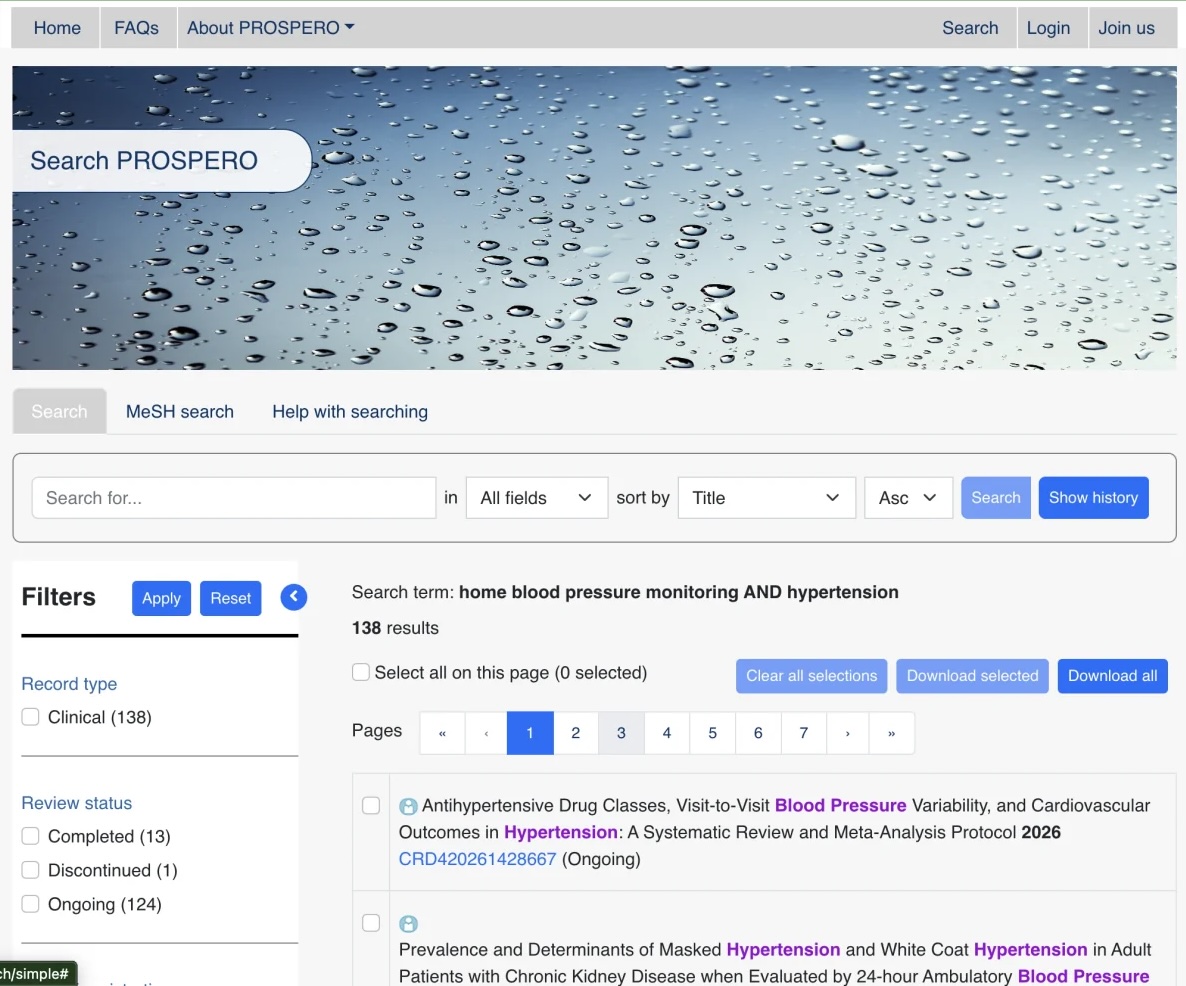
Before going further, check whether somebody has already answered the question or is currently trying to answer it. PROSPERO is an international register of prospectively registered systematic reviews in health and social care.
Finding a similar review does not automatically mean you stop. It may be out of date, answer a slightly different question or use methods that your review could improve. But it should shape what you do next and help you avoid accidental duplication.
Write and register a protocol
A protocol is your plan, written before screening begins. It sets out your question, eligibility criteria, planned search strategy, screening process, data items, risk-of-bias assessment and approach to synthesis.
Registering a protocol does not give you ownership of a topic. It makes your process transparent. Other researchers can see what you intended to do before you saw the results, making it harder to quietly change the methods to suit the findings. Registration also helps other teams discover your work before starting an unnecessary duplicate review.
The protocol can still evolve. You may read the first few full papers and realise that an extraction field is missing or that part of the method needs clarification. The important thing is to document and justify any amendments rather than pretending the original plan never changed.
Build and run the search
This is where many people freeze, but the logic becomes easier once you see it laid out.
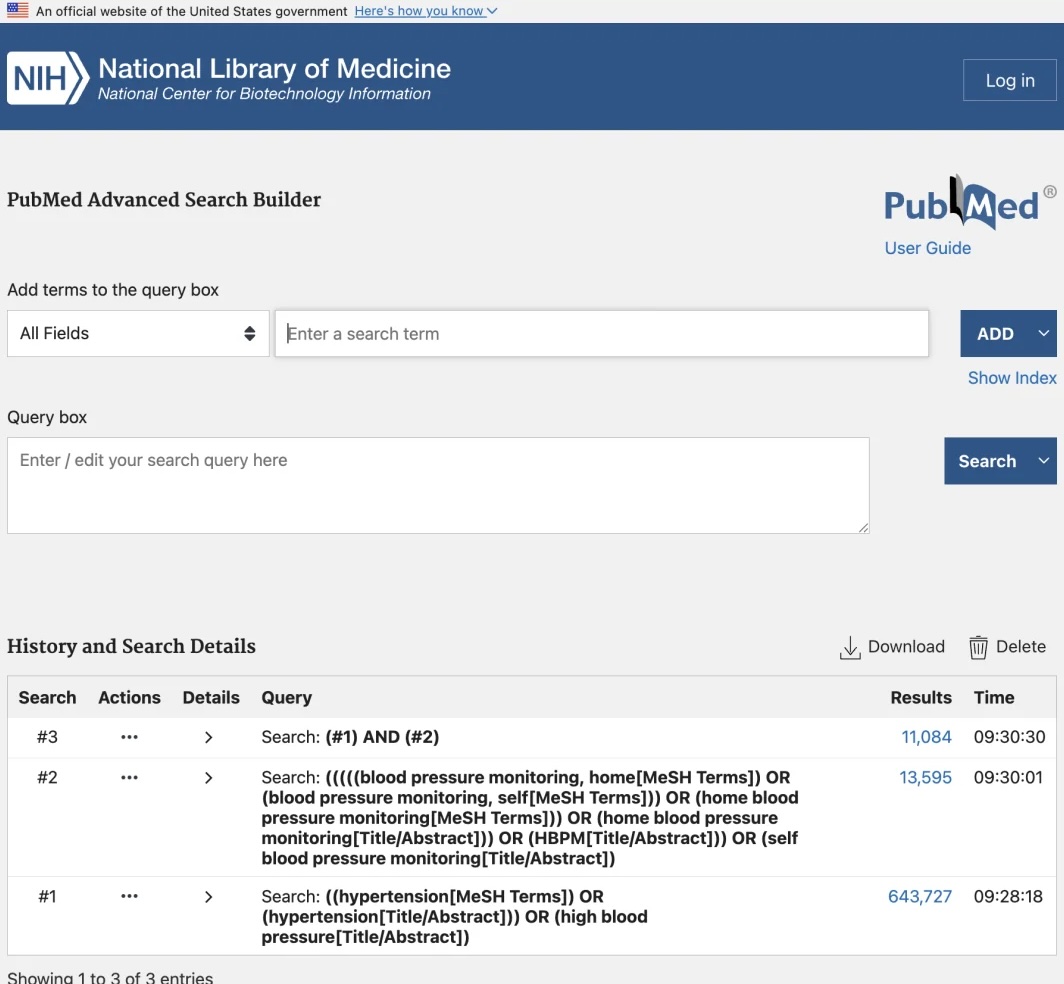
For each major concept in your question, build a short list of synonyms. Hypertension may also appear as high blood pressure. Home blood-pressure monitoring may be described as home monitoring, self-monitoring or HBPM.
Researchers usually combine two types of search terms:
-
Free-text keywords: words and phrases likely to appear in a title or abstract.
-
Controlled vocabulary: standardised subject headings assigned by a database, such as MeSH in MEDLINE/PubMed or Emtree in Embase.
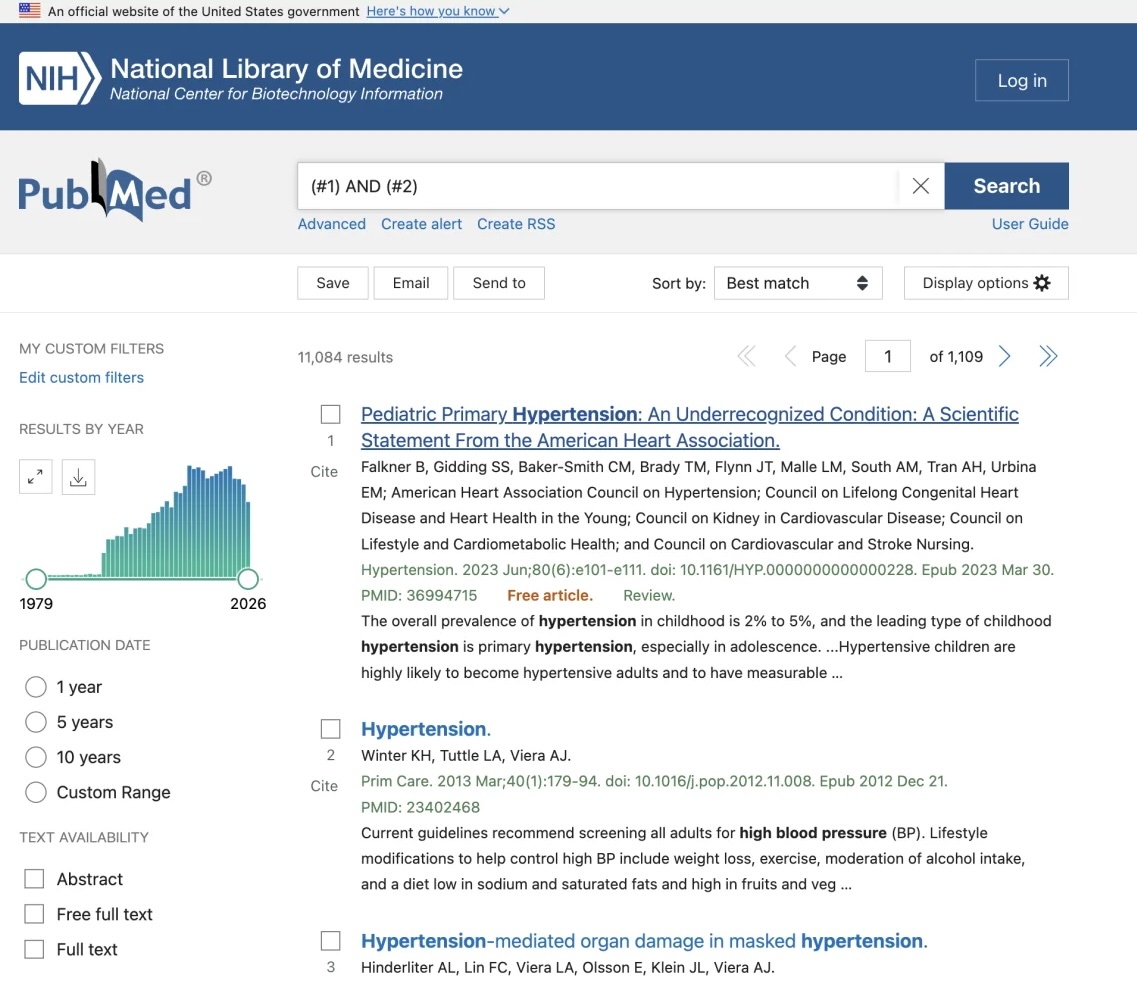
Using both helps catch papers that use different wording. You combine alternatives for the same concept with OR, then connect the main concepts with AND. For example: (hypertension OR "high blood pressure") AND ("home blood pressure monitoring" OR self-monitoring).
You do not always need to search every PICO element. Adding the comparator and outcome can make the search so narrow that relevant papers disappear. Start with the main concepts, run the search, inspect what comes back and refine it. For a real review, it is worth asking an information specialist or librarian to check the final strategy.
Search more than one database
PubMed and MEDLINE are related, but they are not identical. MEDLINE is the US National Library of Medicine’s curated bibliographic database. PubMed is the free search platform that includes MEDLINE records as well as some additional content.
Most reviews search more than one database because their coverage overlaps but is not identical. MEDLINE/PubMed, Embase and the Cochrane Library are common choices. The right combination depends on your question.
At this stage, apply the date and language limits specified in your protocol and save the complete strategy exactly as run, including the date of each search. You will need those details when you write the methods.
Export, organise and remove duplicates
The next step is to export the search results from each database. PubMed’s Send to → Citation Manager option downloads an .nbib file. Other databases may offer RIS, BibTeX or another structured format. The file type matters less than making sure Rayyan can import it.
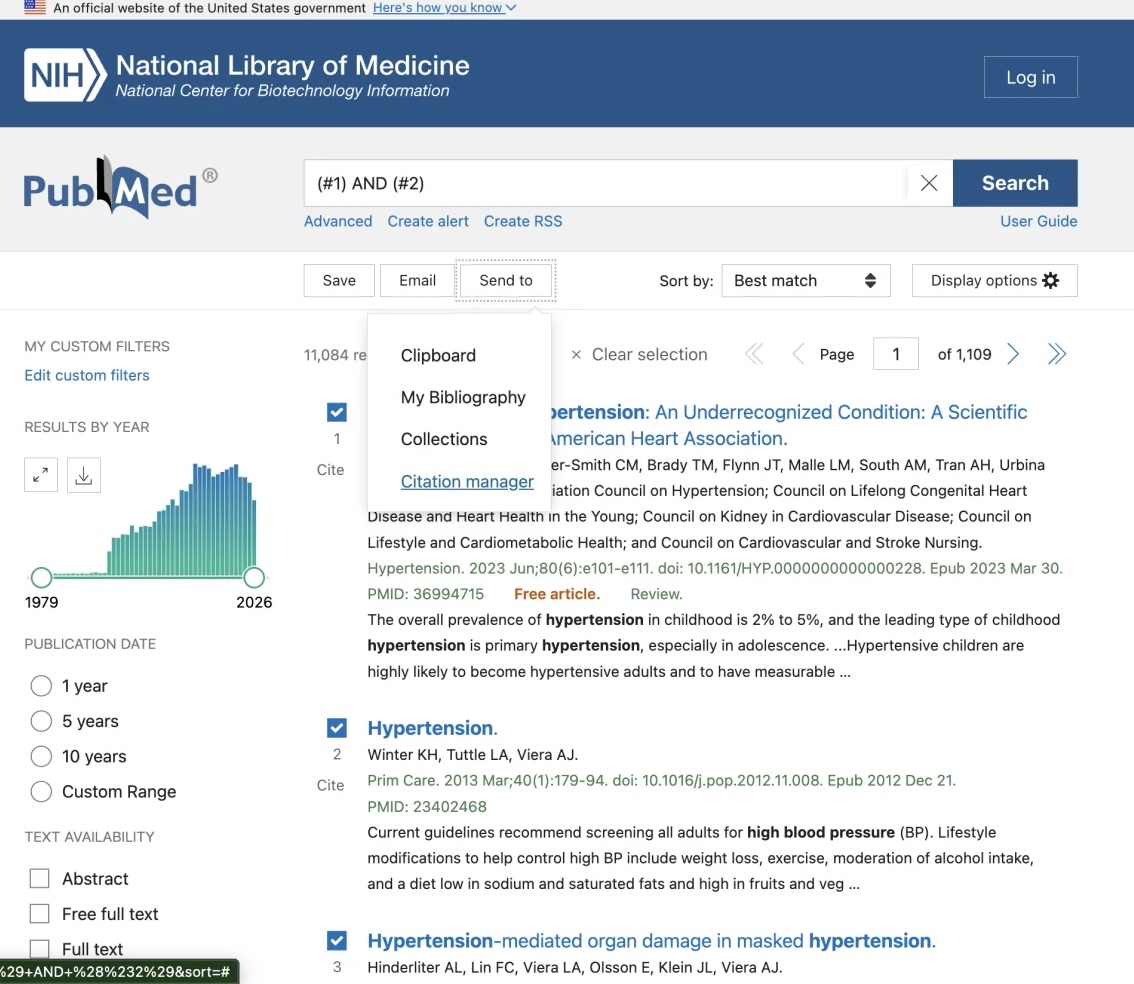
These exports contain citation metadata and may include abstracts; they do not contain the article PDFs. Getting the full texts comes later.
Upload each database export to Rayyan
I create a review in Rayyan and upload each database export to it, one file at a time. I do not put the files into Zotero at this stage. Keeping the database exports separate during upload makes it easier to track how many records came from each source.
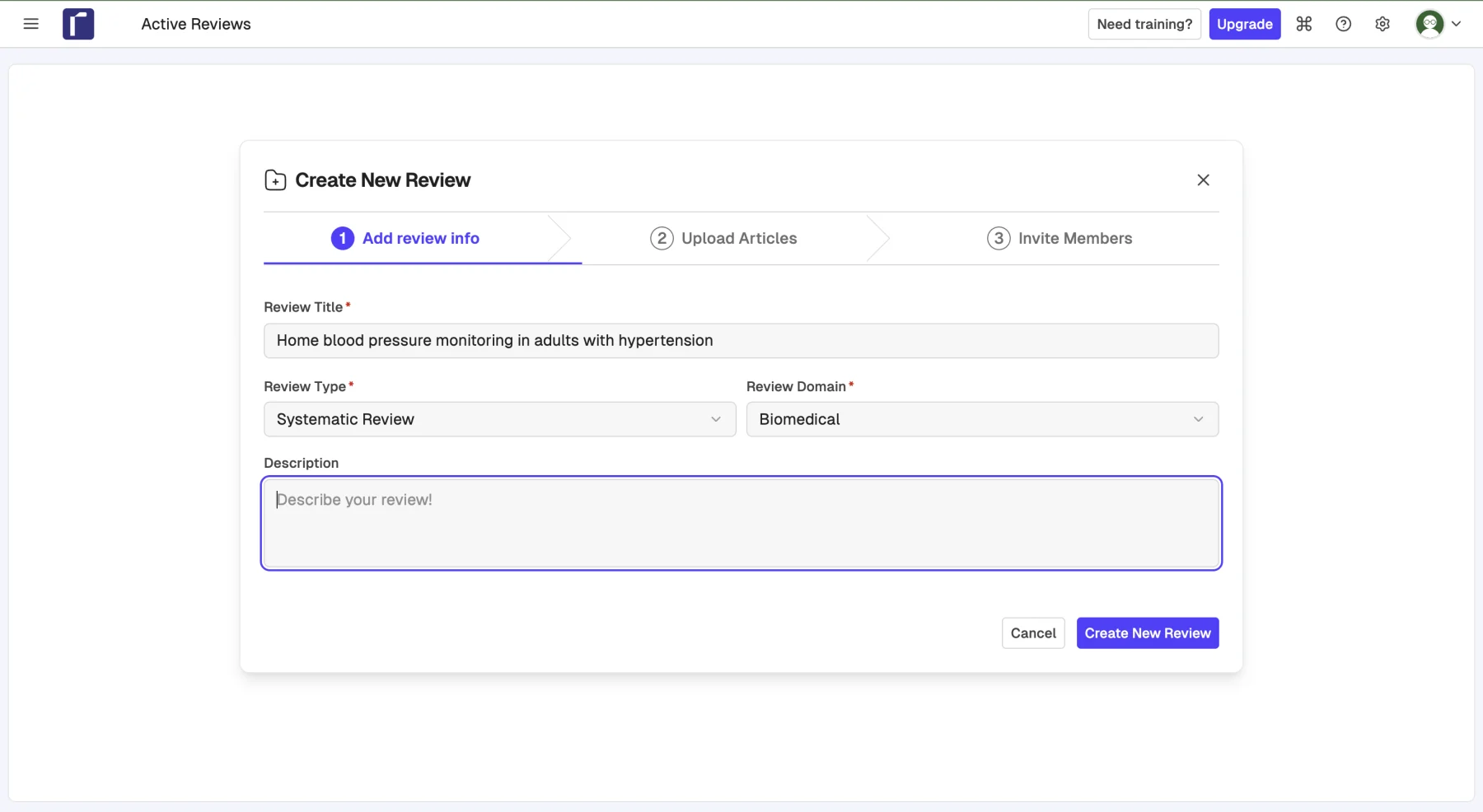
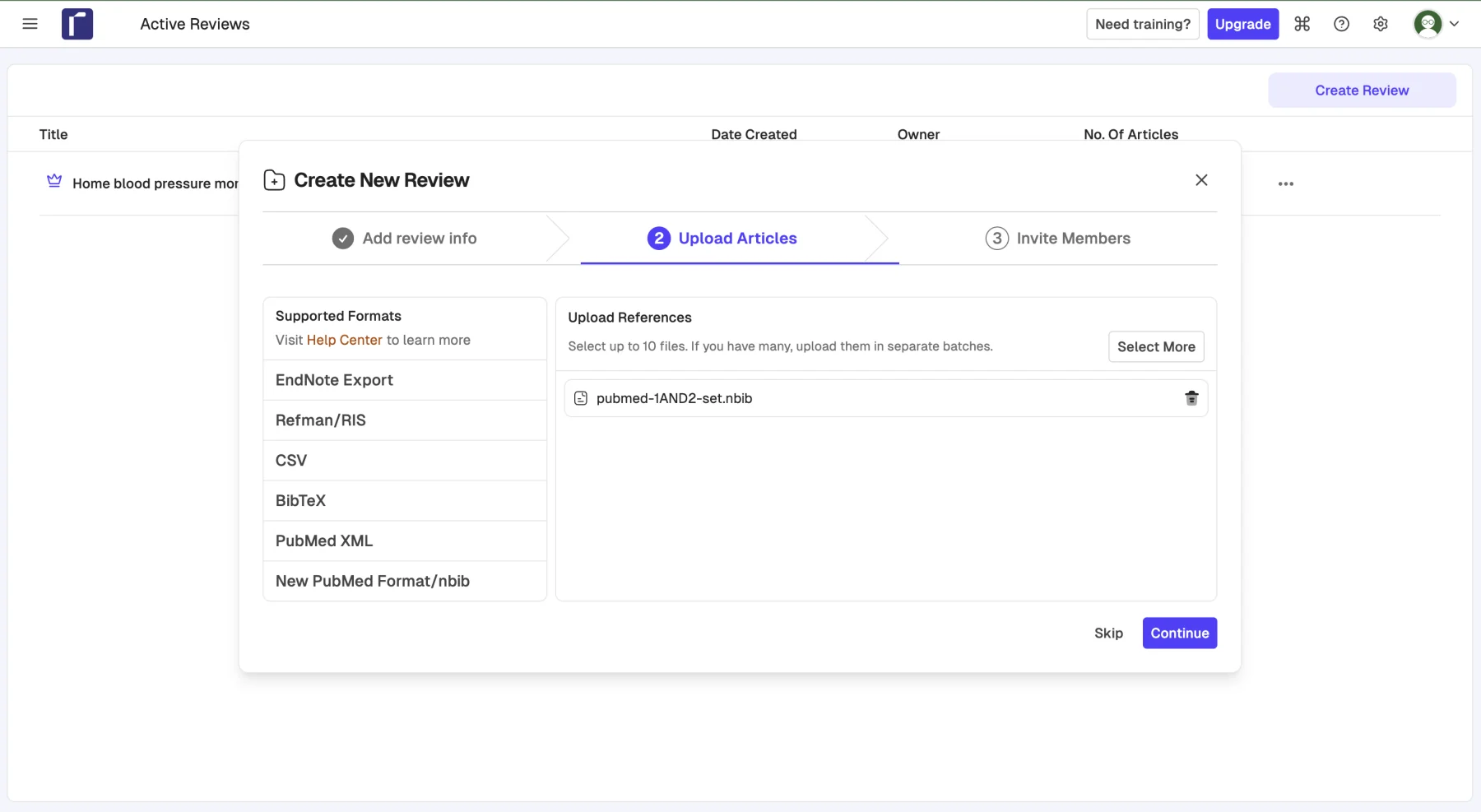
The same paper will often appear in several databases. Once all the files are in Rayyan, I use its duplicate-detection tools to identify and remove those repeated records. I still review the suggested matches rather than treating the automated decision as infallible.
Start a working document at this point and record the number retrieved from every source, the number removed as duplicates and the number left for screening. These figures feed directly into the PRISMA flow diagram later.
Screen the studies
Title and abstract screening in Rayyan
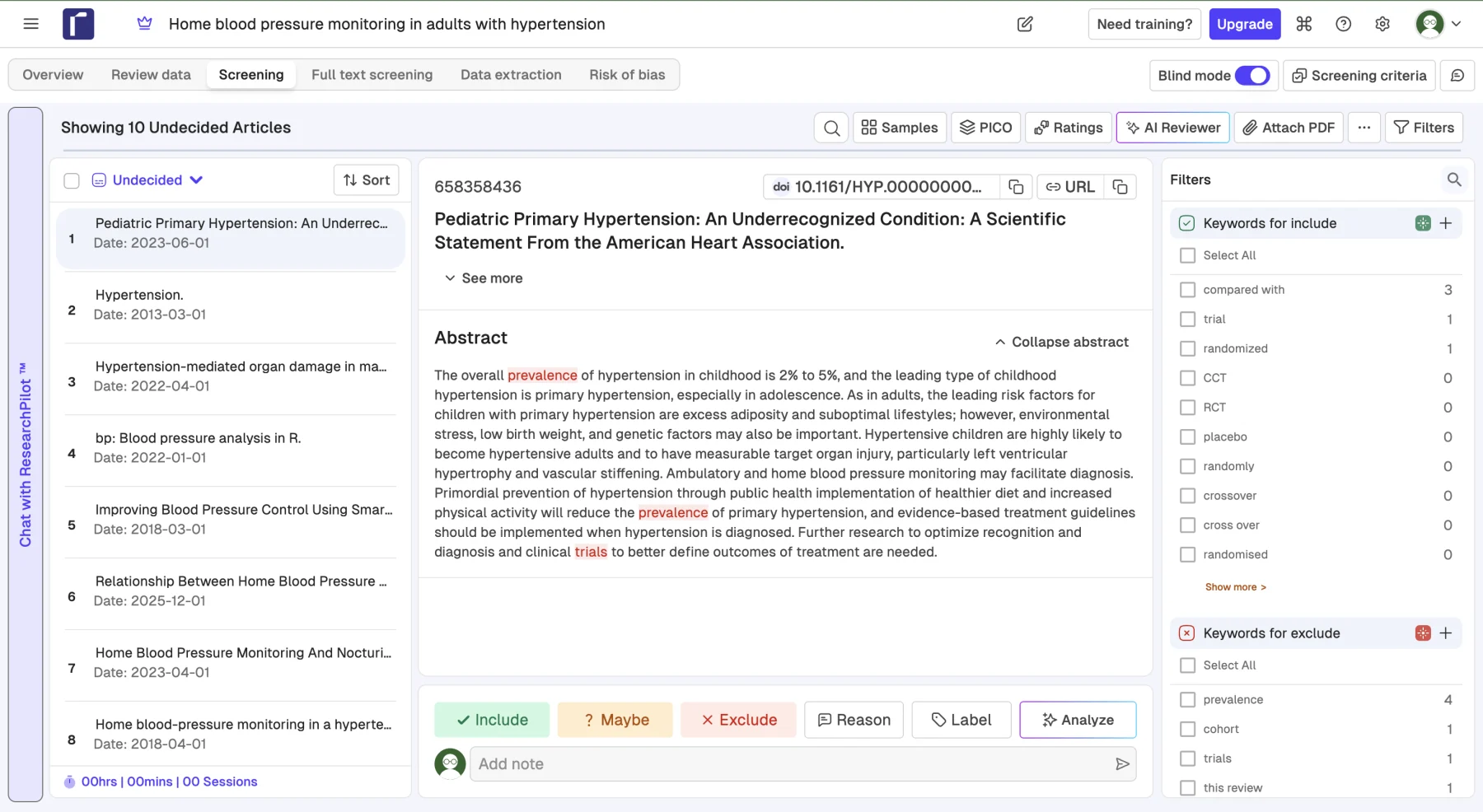
With the duplicates removed, I use Rayyan for title and abstract screening. Read the title and abstract of each result and decide whether it could meet the eligibility criteria. Apply criteria defined in advance, such as the population, study design or date range, rather than inventing new rules as you go.
Ideally, two reviewers do this independently, without seeing each other’s decisions until both have finished. Disagreements are then discussed and resolved, with a third reviewer available if needed. Blinding the first-pass decisions helps prevent one reviewer from simply following the other.
Move the screened references to Zotero
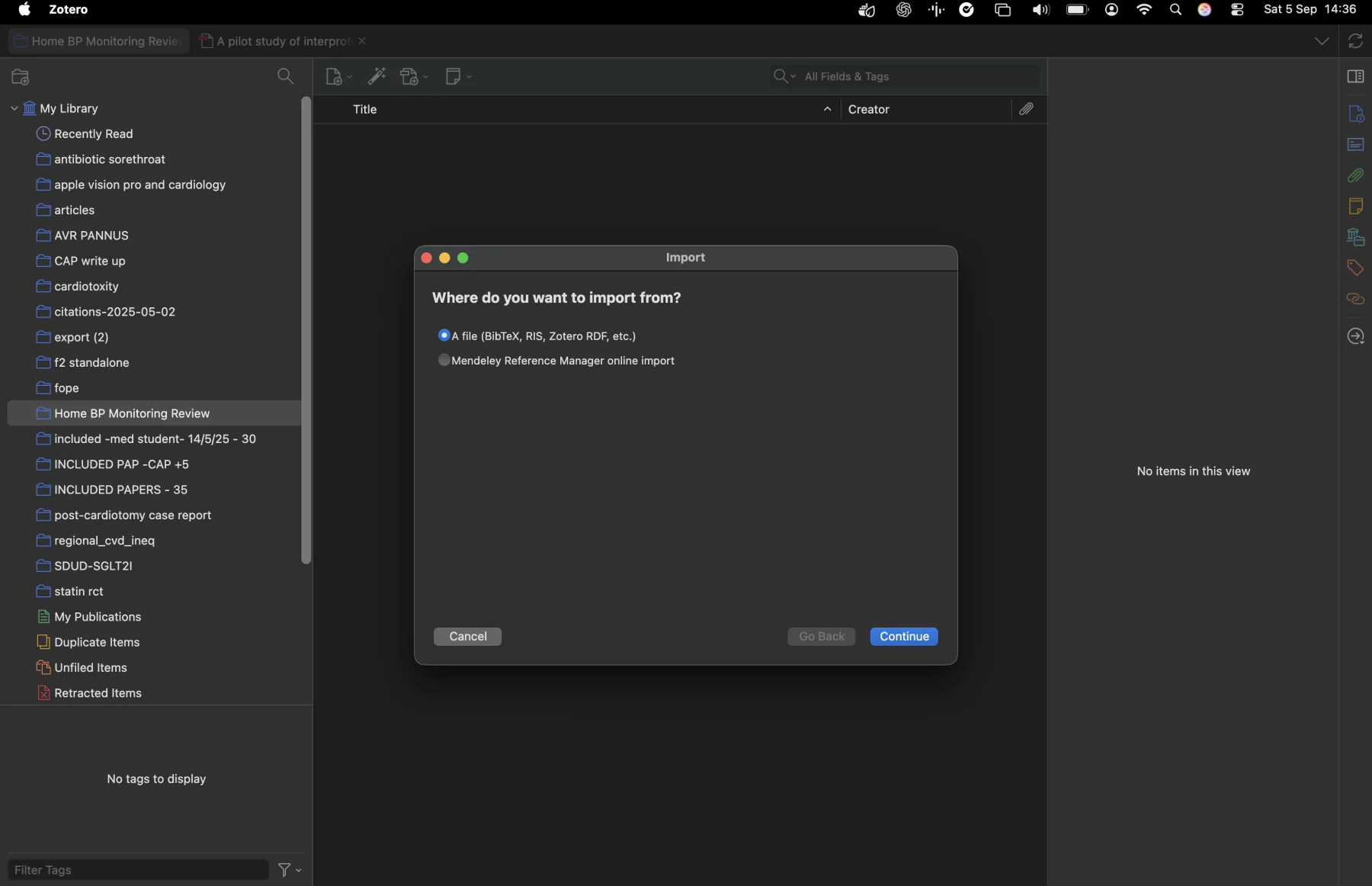
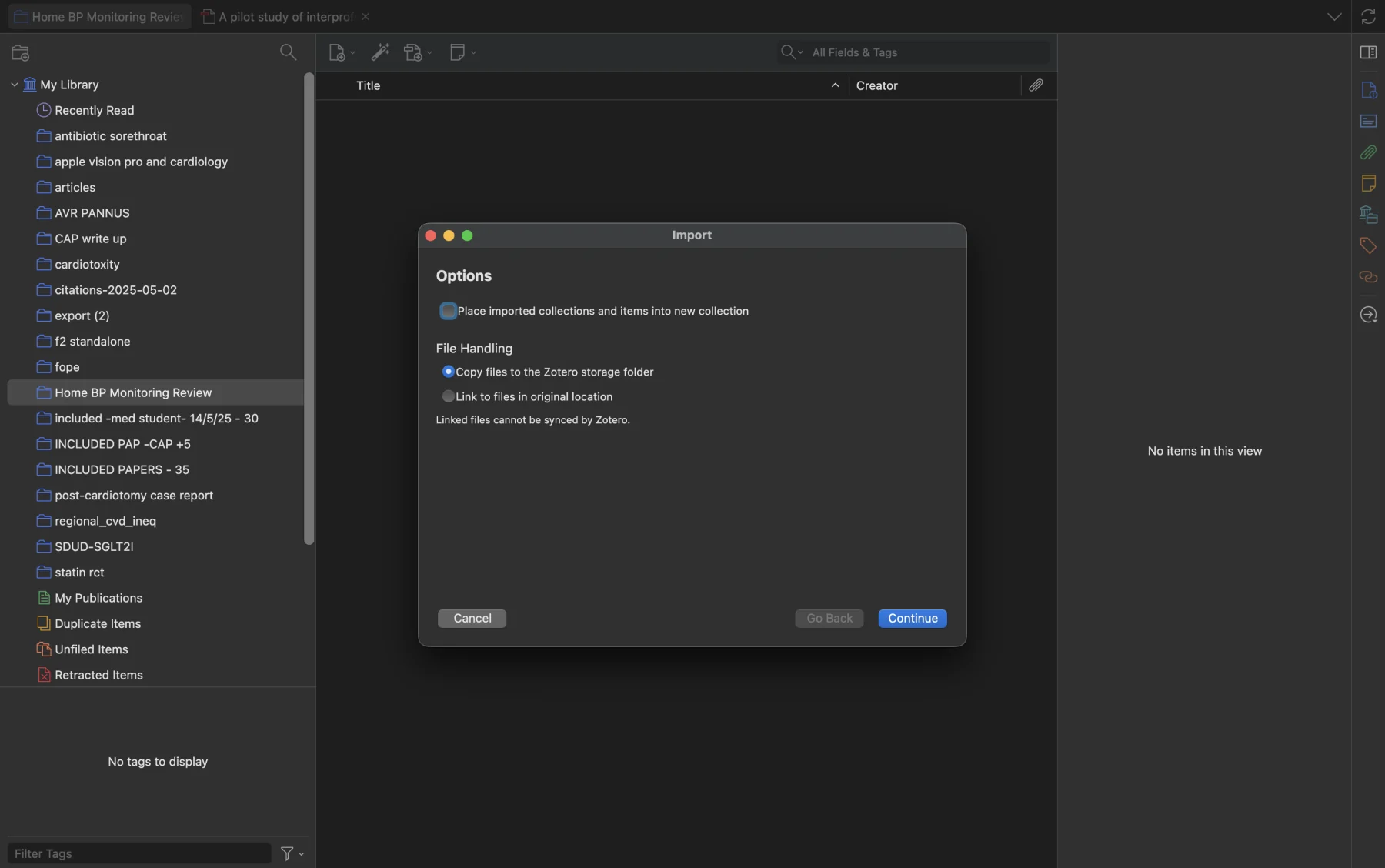
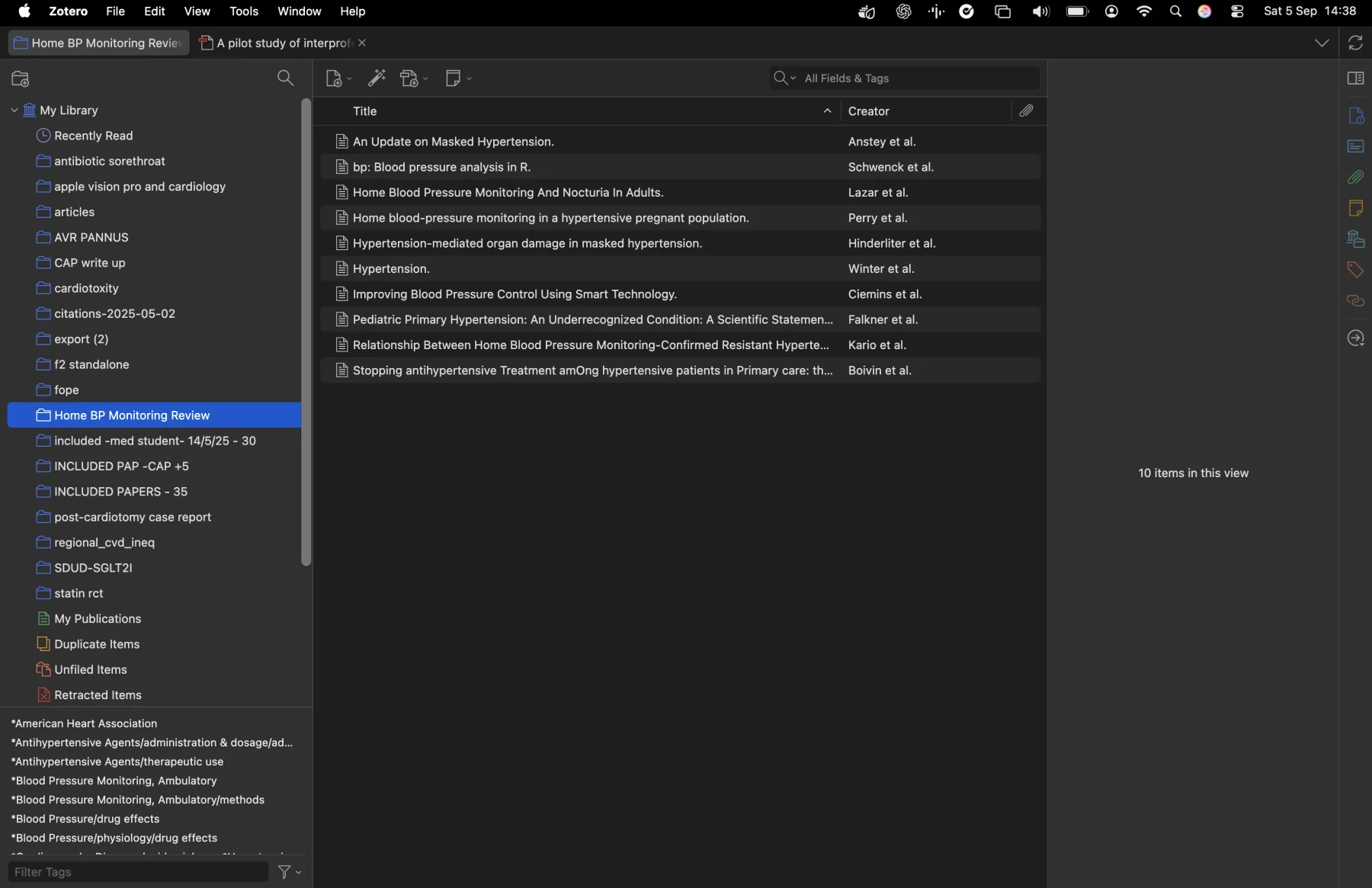
When title and abstract screening is complete, I export the records kept for full-text review from Rayyan as an RIS or NBIB file. I then import that file into a dedicated Zotero collection. By this point, the records have already been deduplicated and narrowed down in Rayyan.
Full-text screening in Zotero
Zotero is where I manage the full-text papers. After importing the Rayyan export, I use Zotero to find PDFs that are available openly. Some papers can be retrieved straight away. Others require a university or hospital login, and a librarian can often help with papers I still cannot access.
If I download a paper through a university login or receive it from the library, I add the PDF to the same Zotero collection. That keeps the citation and full text together rather than leaving papers scattered across email attachments and download folders.
I then do the full-text review from this collection. Some studies that looked promising from the abstract will not qualify once I see the complete methods or outcomes, so I record one clear reason for every full-text exclusion.
Zotero remains useful after screening. When I eventually start writing the manuscript, I use the same library as my reference manager to insert citations and build the reference list.
Want to see how these steps fit together in practice? I will be walking through the process live in a free webinar.
Track the screening process with PRISMA
PRISMA 2020 is a reporting guideline for systematic reviews. Its flow diagram shows how the search results became the final set of included studies: how many records you found, how many duplicates you removed, how many you screened and why full-text papers were excluded.
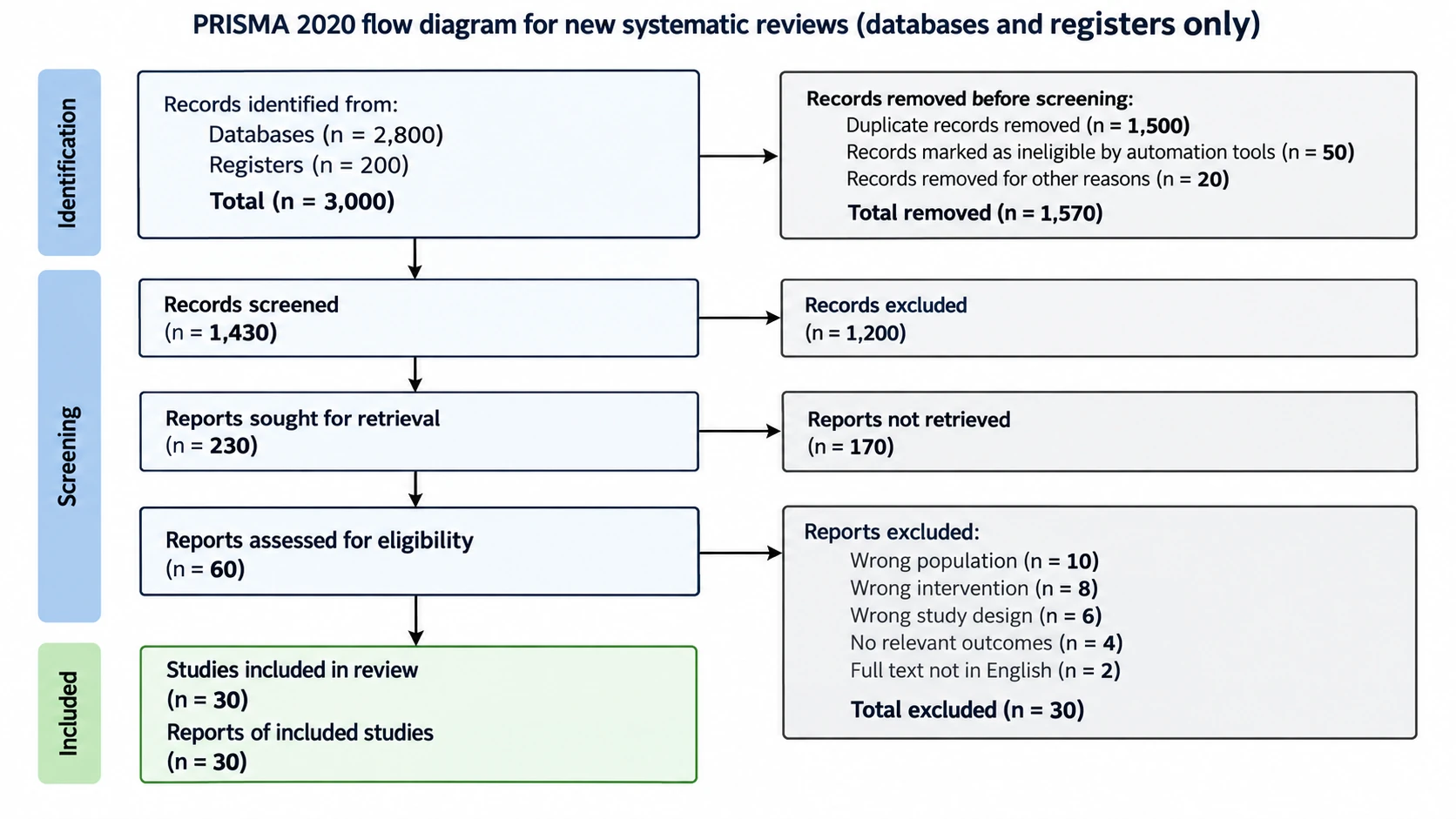
This is why I keep a running record from the first database search onwards. Trying to reconstruct the numbers at the end is one of the easiest ways to lose track of where records disappeared. The papers that remain at the bottom of the diagram are your included studies. Those are the papers you take into data extraction.
Extract the data and assess risk of bias
The process often blurs these into one task, but they answer different questions.
Data extraction: what did the study report?
Data extraction captures the study details, population, intervention or exposure, comparator, sample size, outcomes, follow-up duration and numerical results.
My workflow is to build a Google Form with a field for each item in the protocol. Every included paper gets its own submission, and the responses feed into a Google Sheet.
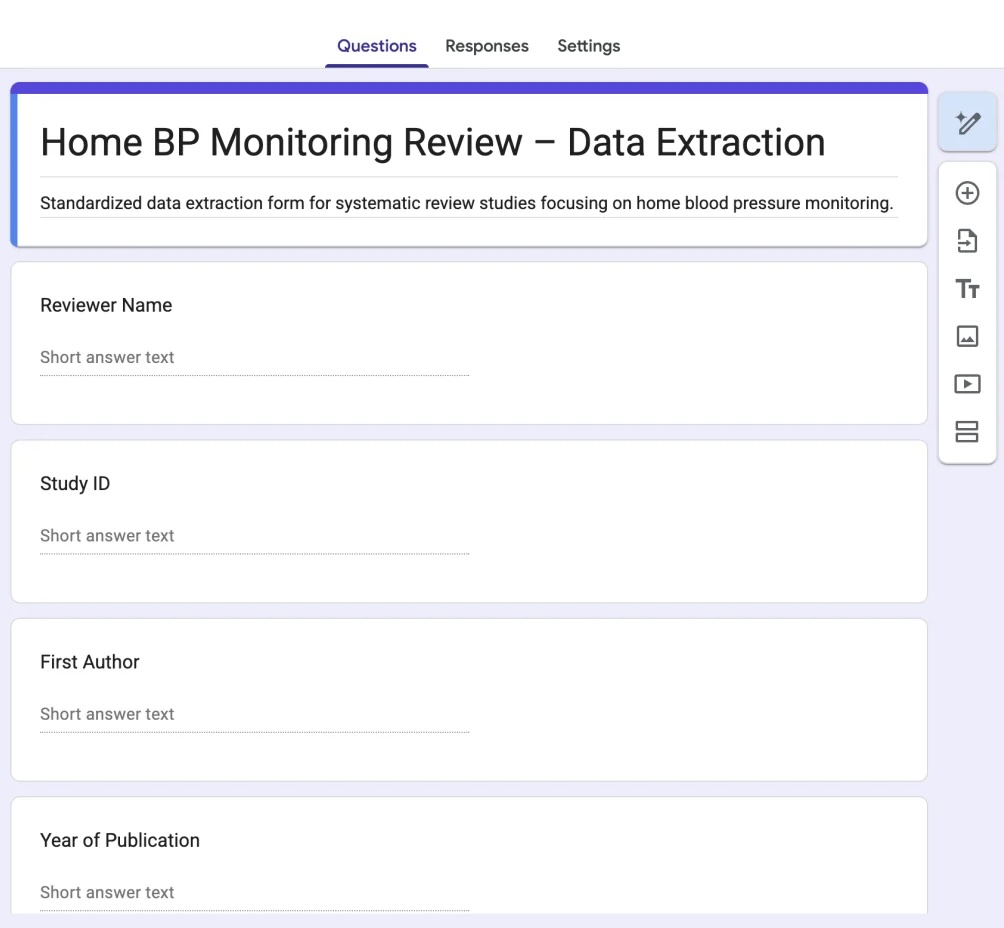
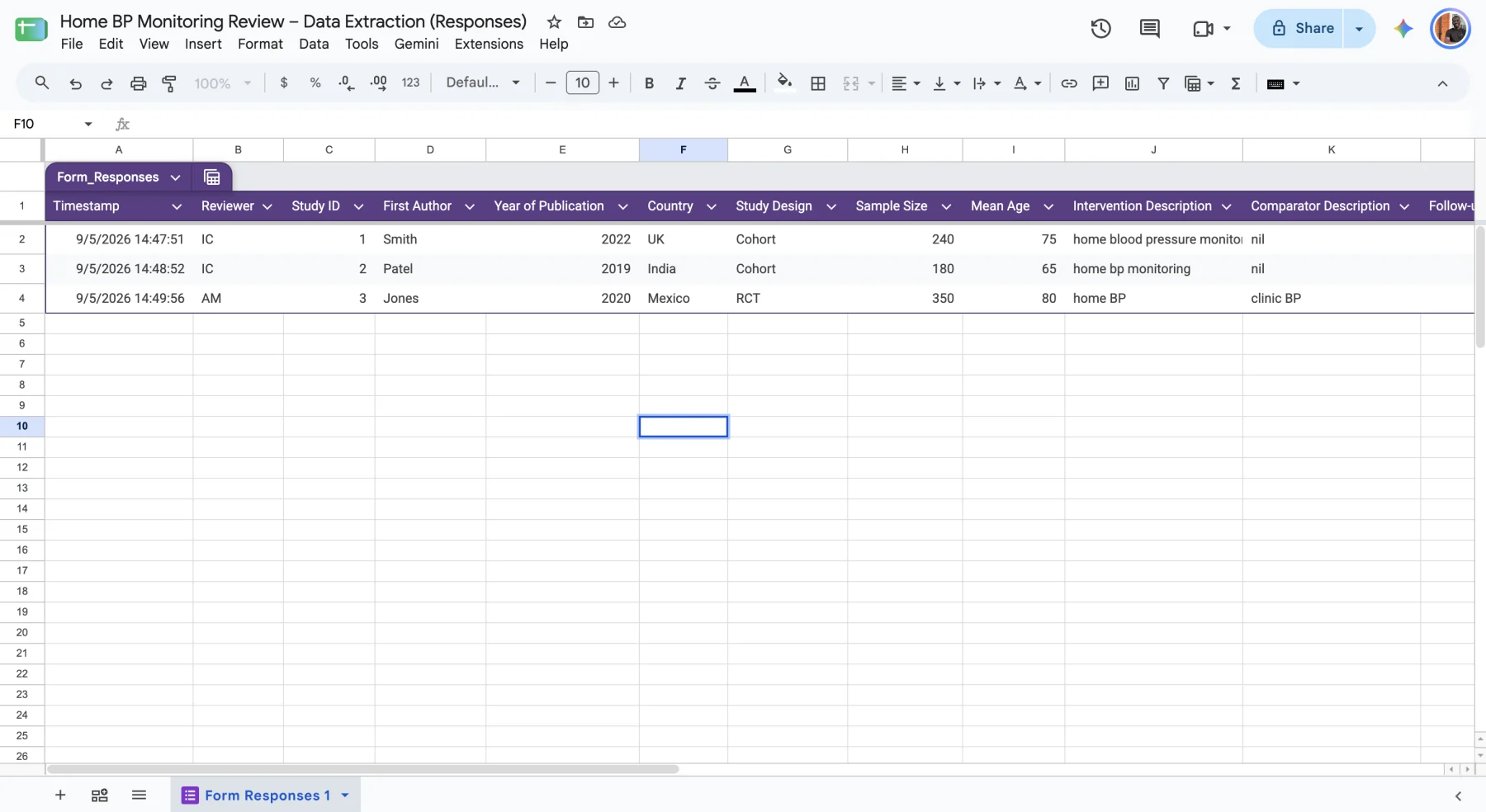
I like this approach because the structure forces everyone to capture the same information. It prevents the messy, inconsistent spreadsheet that emerges when collaborators create their own columns, and it makes later export to R or Python straightforward.
Google Forms and Sheets are not a methodological requirement. A shared Excel workbook or specialist extraction software may work just as well. Use the tool that keeps the fields consistent, supports independent checking and leaves a clear audit trail.
Risk of bias: how much should we trust the result?
A study can report its results clearly and still be at high risk of bias. Randomisation may have been inadequate, outcome assessors may not have been blinded or many participants may have been lost to follow-up. Extracting a number is not the same as deciding how much confidence to place in it.
The correct tool depends on the study design. Randomised trials and non-randomised studies have different sources of bias and need different assessment tools. I handle this with a separate form based on the appropriate tool, completed independently by two reviewers. We compare judgements, discuss disagreements and agree the final assessment.
The distinction is worth holding onto: data extraction tells you what the studies found; risk-of-bias assessment tells you how much to trust those findings.
Synthesise and interpret the evidence
Once extraction and risk-of-bias assessment are complete, bring the evidence together.
If the studies are sufficiently comparable in their population, intervention and outcome measurement, a meta-analysis may be appropriate. The detailed statistical choices matter, but you do not need to master them to understand this stage of the workflow.
If the studies are too different to combine meaningfully, describe the findings using a structured narrative synthesis. Do not force a pooled number simply because a forest plot looks more impressive.
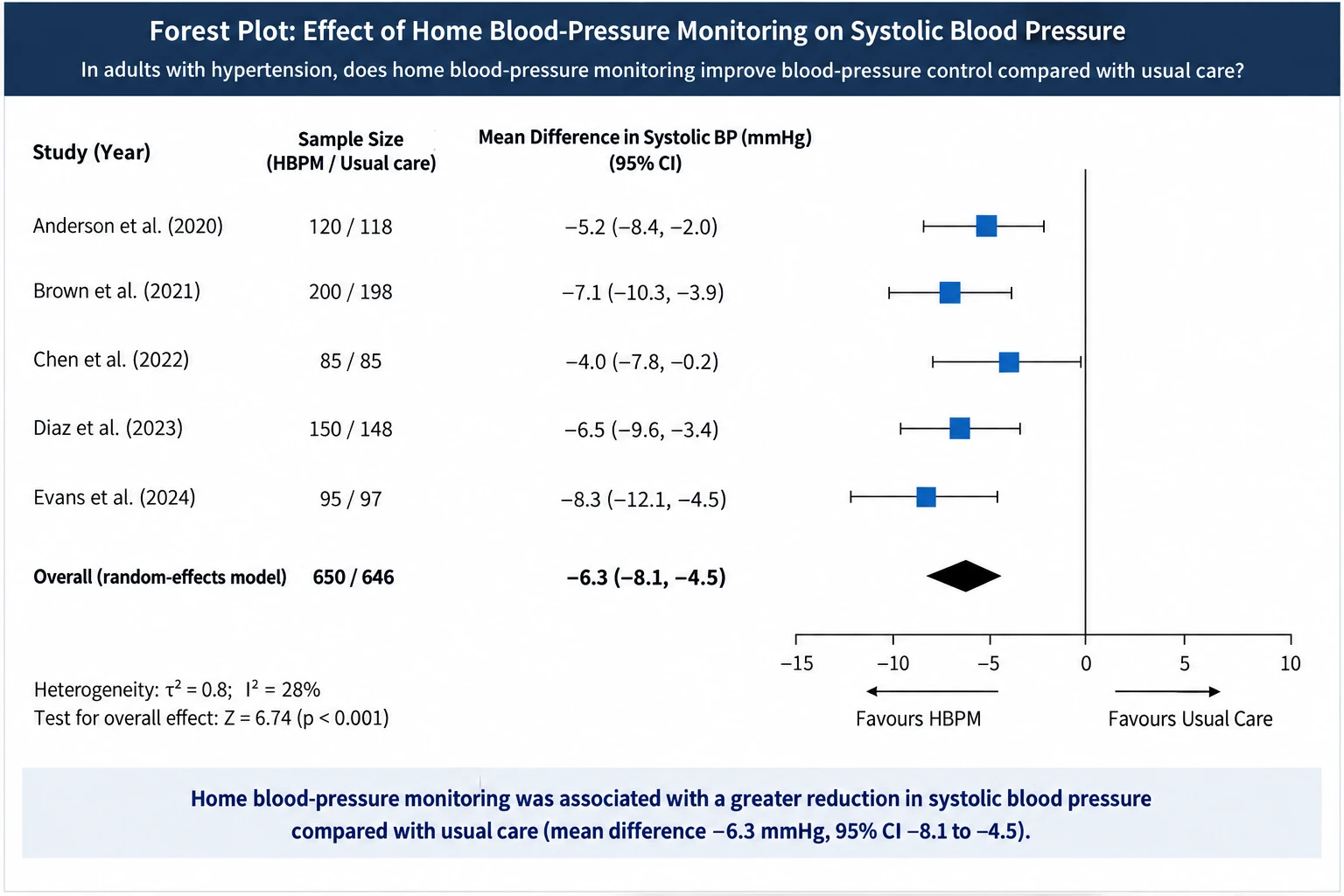
The statistical analysis is often done in R or a specialist meta-analysis package. AI tools can help write or troubleshoot code once you understand the data and have decided which analysis is methodologically appropriate.
Interpretation matters as much as calculation. Discuss the size and precision of the effects, consistency across studies, risk of bias, applicability to the real clinical question and limitations of both the evidence base and your own review process.
When you write the review, return to the full PRISMA checklist. The flow diagram is the most familiar part, but the checklist also helps you report the question, methods, results and limitations clearly enough for somebody else to assess what you did.
Why this is a team job
Independent screening and independent assessment appear repeatedly for a reason. Good systematic reviews have more than one person making the key judgement calls, particularly during screening, data checking and risk-of-bias assessment.
It is too easy for one person’s assumptions to shape which papers are included and how their quality is judged. Having a second reviewer and a clear way to resolve disagreements is one of the main things that makes a review trustworthy rather than merely thorough.
Where AI fits
AI can explain what PICO or PRISMA mean in a few seconds. It can also help generate candidate synonyms, organise pilot extraction fields or troubleshoot analysis code.
What it is less reliable at is recognising where a review is going wrong in practice: whether the search is silently missing a concept, whether two interventions are truly comparable, whether a paper meets a nuanced eligibility criterion or whether a risk-of-bias judgement is defensible. Those decisions need methodological understanding, transparent documentation and human checking.
Treat AI output as material to verify, not as an independent reviewer whose judgement can be accepted without scrutiny.
The whole process, end to end
Put together, the workflow looks like this:
-
Ask a specific question and frame it with PICO or another suitable framework.
-
Check PROSPERO and the published literature for existing reviews.
-
Write and register a protocol.
-
Build the search with free-text terms and controlled vocabulary.
-
Search all relevant databases and record the exact strategies and dates.
-
Upload each database export to Rayyan and remove duplicates there.
-
Screen titles and abstracts independently in Rayyan.
-
Export the records kept for full-text review to Zotero, attach the PDFs and screen the full texts there.
-
Complete the PRISMA flow diagram and identify the final included studies.
-
Extract the study data and assess risk of bias as separate tasks.
-
Synthesise the evidence statistically or narratively.
-
Interpret the findings honestly, report the review using the PRISMA checklist and manage the citations in Zotero while writing.
Reading that list and actually doing it are two very different experiences, which is exactly why most people find their first review the hardest.
Want to see me do this live?
I am putting together a free webinar where I will take a research question and walk through the basic systematic-review process from start to finish.
Enter your name and email address and I will let you know when the webinar is happening.